

RELINK_NEEDED and stops syncing.
Reads keep returning the last successful sync, so downstream systems treat stale data as current. The data endpoints answer 200 throughout.
Before you start
- You’ve confirmed the failure is credential-related, rather than a permission gap - see Origin-system errors.
- You can reach the customer’s HRIS administrator.
Steps
1
Open the connector
Locate it under Connectors. The Relink Needed counter above the list totals every connection in this state.Result: You can see its current status and sync history.
2
Generate a relink
A connector needing re-authorization carries a Relink Needed banner with the date it entered that state, and Force Sync is disabled. Click Relink Connector to produce an updated Magic Link for the same connector.Result: A link ready to send to the customer.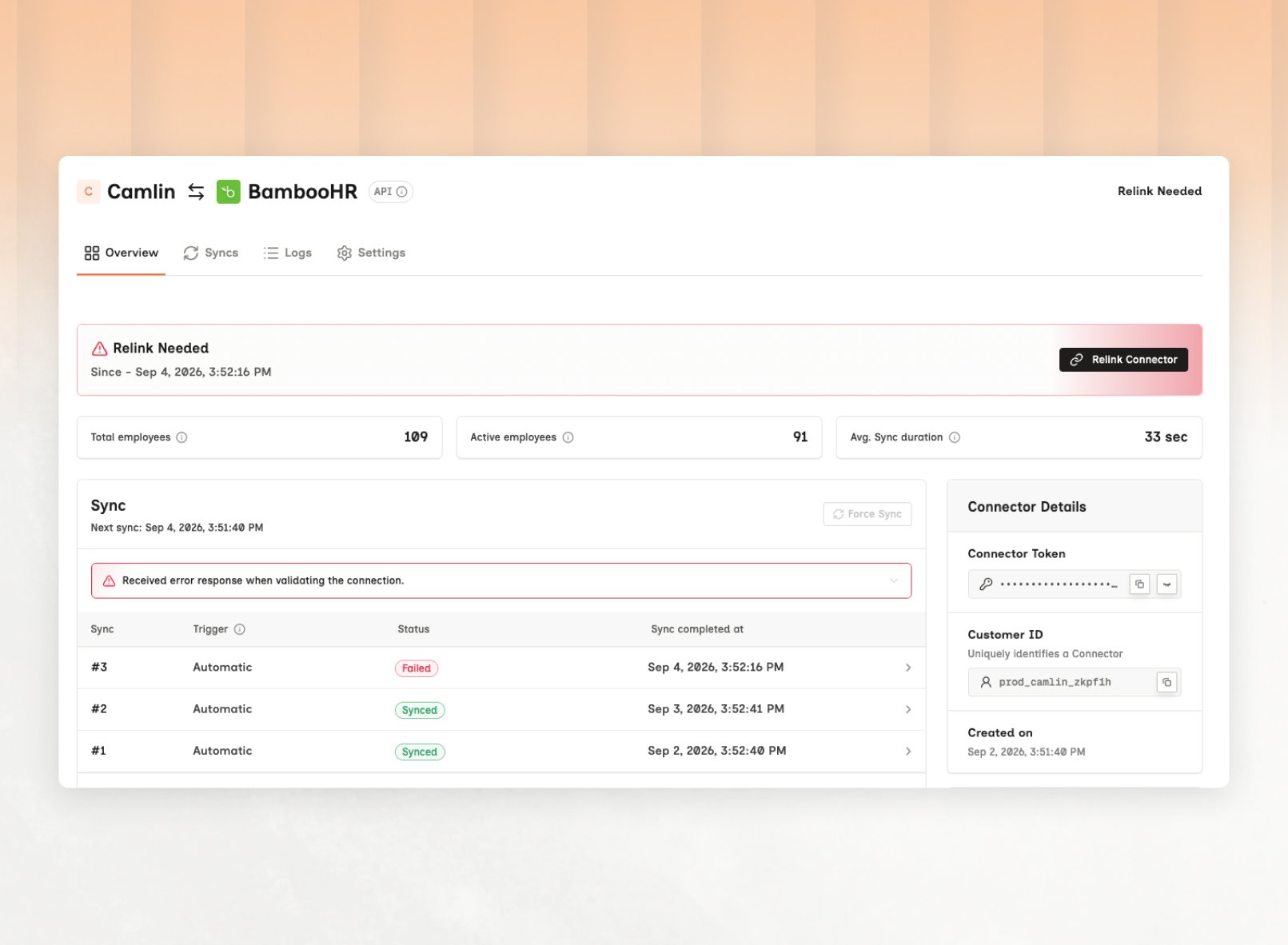
3
Send it to the administrator
Forward the link to whoever administers their HRIS, with the relevant guide from help.bindbee.dev.Where a token, certificate, or integration user was rotated on their side, they need the new values ready before opening the link.Result: The customer has what they need to reconnect.
4
Resync and verify
Once they’ve reconnected, trigger a sync rather than waiting for the next scheduled run. Then check the run completed in the connector’s sync history.Result: The connector is syncing again and the data is current.
The
connector_token survives a relink. Relinking updates the credentials behind the
connector rather than the connector itself.Relinking versus deleting
A connector inRELINK_NEEDED has two exits.
Relinking keeps the connector’s identity, history, records and connector_token, and syncing resumes where it left off. This is the right response to a broken connector.
Deleting removes the connector and its data - identifiers, records, sync history. Recovery means a new connector and a fresh initial sync. Every record comes back with a new Bindbee id, breaking any foreign key you stored.
Deletion earns its place when a customer churns or a connection was created in error - see Data deletion.
Catch it earlier
The expensive part is the days before anyone notices. Subscribe toconnector.relink_needed and a broken connection reaches you the day it breaks. It fires once, when the connector moves to RELINK_NEEDED, and connector.relinked follows when your customer reconnects - see Webhook events.
connector.sync.failed fires on every failed sync, including the ones that need no action, so act on connector.relink_needed instead. A version 1 webhook has no relink event, so branch on connector.connector_status in the connector_sync_error payload. RELINK_NEEDED is the one value that means your customer must act. The rest retry on the next scheduled sync.
A connector can sit at
COMPLETE with its last sync Failed. Credentials are fine and data
still isn’t arriving, which is a different problem - see Sync status.Frequently Asked Questions
The relink completes but the sync fails the same way
The relink completes but the sync fails the same way
The credentials are valid and lack the access the sync needs - see Origin-system errors.
You can't reach the customer and the connection is blocking your pipeline
You can't reach the customer and the connection is blocking your pipeline
Mark the connection degraded in your own system so downstream jobs skip it rather than consuming stale data. The connector keeps its last synced state.
Credentials keep expiring on the same connector
Credentials keep expiring on the same connector
Recurring expiry points at a personal account subject to password rotation or offboarding, where a dedicated integration user belongs. A service account fixes it permanently.
Related
- Sync status - the first check, and where sync alerting is set up
- Errors - when credentials work and a model still fails
- How connections work - how a connector is created
- Record identity - why a delete-and-recreate changes every stored
id