> ## Documentation Index
> Fetch the complete documentation index at: https://docs.bindbee.dev/llms.txt
> Use this file to discover all available pages before exploring further.
# Webhooks
> With Webhooks, you can receive real-time updates on connector sync statuses, as well as notifications whenever HRIS data is created or modified. This ensures you stay up-to-date with the latest changes and maintain accurate, synchronized information across your systems, enhancing your workflow efficiency and data reliability.
## Create Webhooks
To create webhooks, follow the instructions below.
**Step 1:** Navigate to the “Webhooks” section from the sidebar under the “Configure” menu.
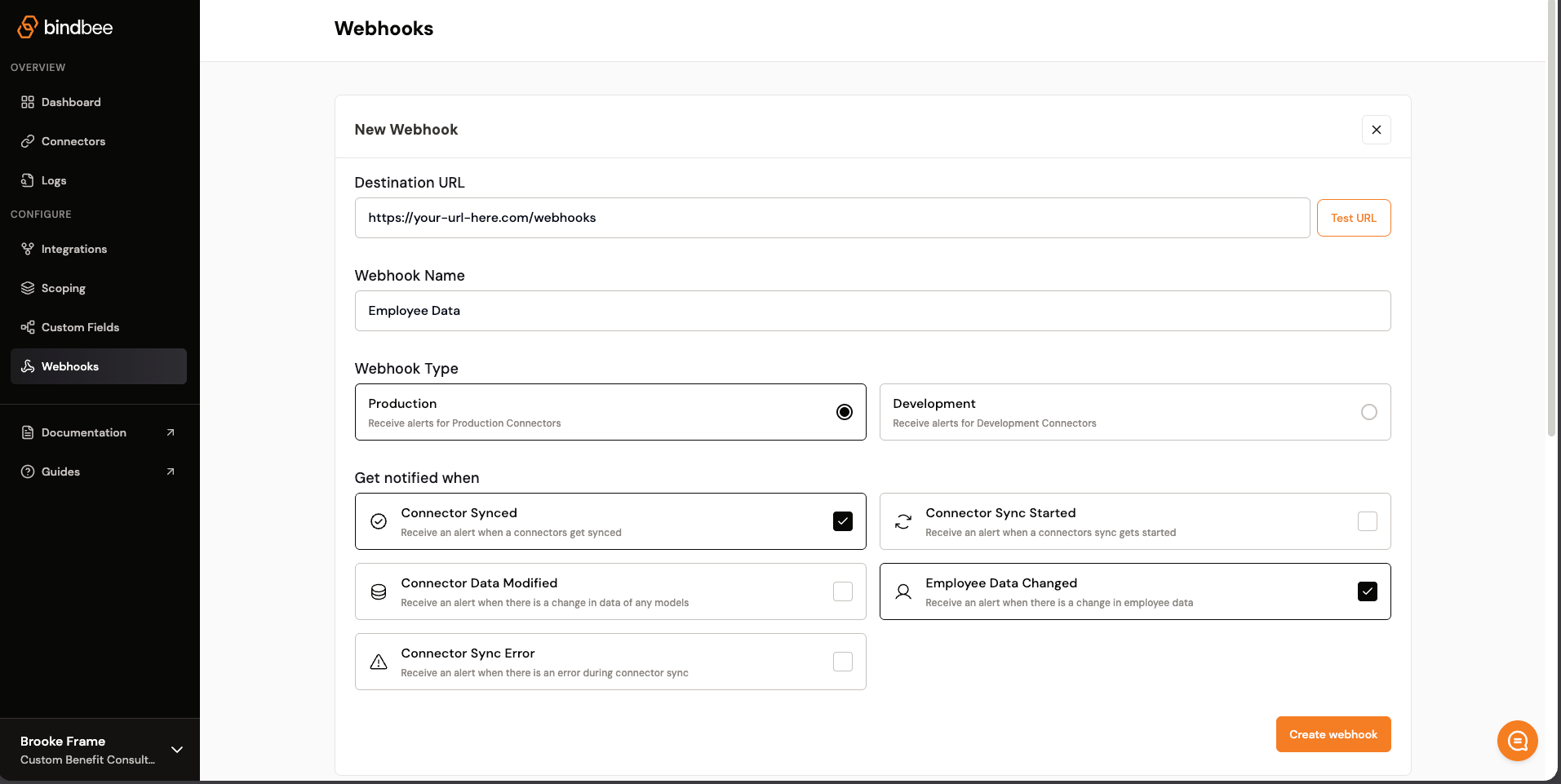 **Step 2:** In the “New webhook” section, enter the destination URL where you want to receive the webhook notifications in the “Destination URL” field.
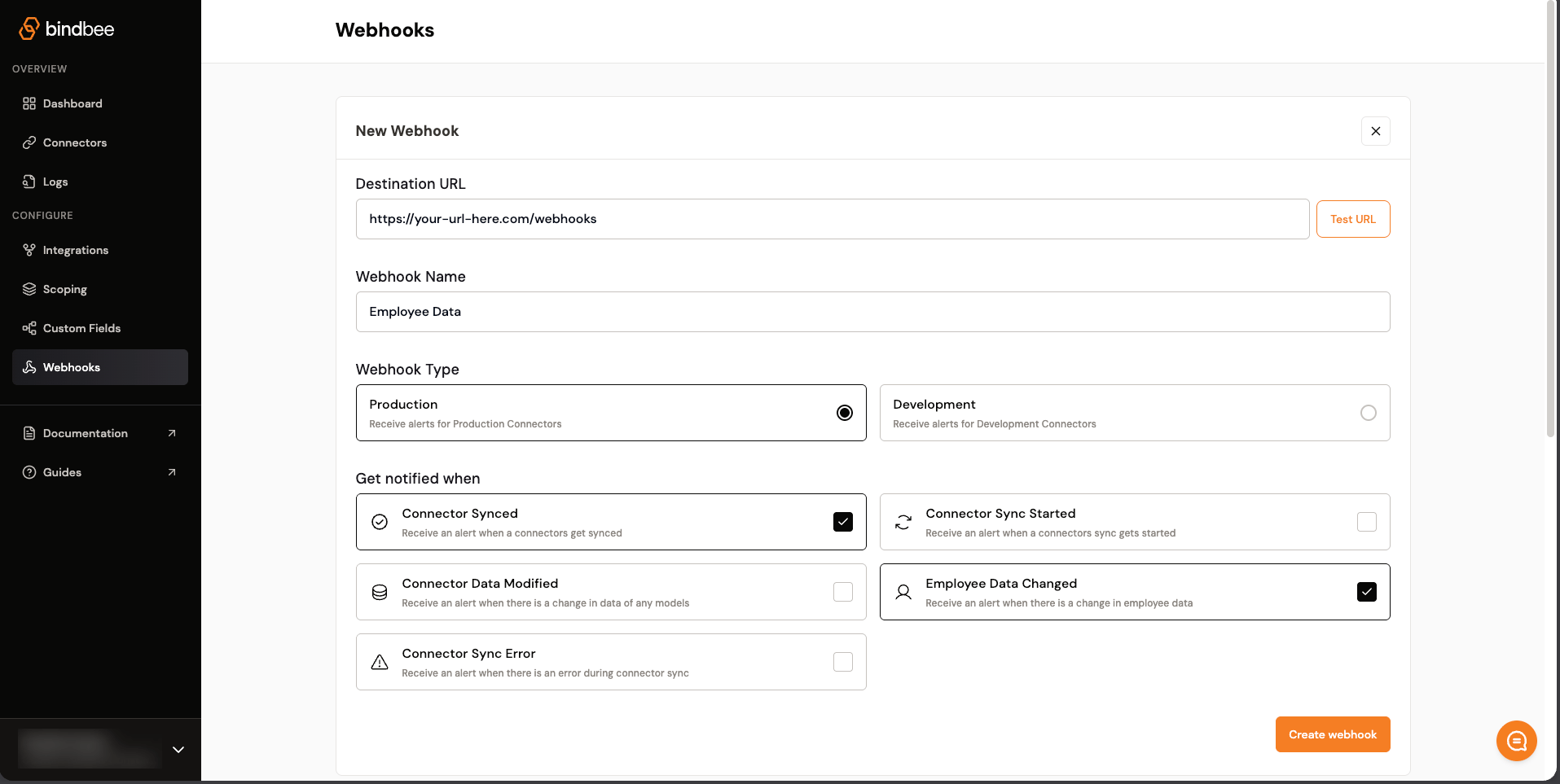 **Step 3:** Optionally, click the “Test URL” button to ensure that your destination URL is correctly set up and can receive test data.
**Step 4:** Provide a meaningful name for your webhook in the “Webhook Name” field. For example, “Employee data.”
**Step 5:** Under “Webhook Type,” select the environment for which you want to receive webhook alerts.
| Webhook Type | Receives alerts for | Recommended use |
| --------------- | ---------------------- | ---------------------------------- |
| **Production** | Production connectors | Live customer integrations |
| **Development** | Development connectors | Testing and development connectors |
> Note: Production and Development webhooks are environment-specific. This means a Production webhook will only receive alerts for connectors created in the [Production environment](https://docs.bindbee.dev/features/environments/production), while a Development webhook will only receive alerts for connectors created in the [Development environment](https://docs.bindbee.dev/features/environments/development).
**Step 6:** Choose the events for which you want to receive notifications by selecting the appropriate checkboxes:
* **Sync start**: Receive an alert when a connector’s sync starts.
* **Sync error**: Get notified when a connector sync fails.
* **Sync completed**: Get notified when a connector sync job is successful.
* **Employee model change**: Receive an alert when any employee data is modified.
* **Data model change**: Receive an alert when any data model is modified.
**Step 7:** Once you have filled in all the required fields and selected the notification triggers, click the “Create webhook” button to save your webhook configuration.
## Payload Properties
* `webhook`: Information about the webhook that was triggered.
* `connector`: Information about the connector associated with the event.
* `data`: The affected connector sync status data.
* `sync`: Information about the sync job that triggered the event. This object is included in all webhook payloads.
* `error`: Information about the sync failure. This object is included only in the `connector_sync_error` webhook.
### Sync information
All webhook payloads include a top-level `sync` object in the following format:
```json theme={null}
{
"sync_id": "019f146e-8396-7c6d-aff3-c5760bf5eefe",
"sync_type": "AUTOMATED",
"sync_name": "#13"
}
```
| Field | Description |
| ----------- | --------------------------------------------------------------------- |
| `sync_id` | The unique identifier of the sync job. |
| `sync_type` | How the sync was triggered. Possible values:`MANUAL` and `AUTOMATED`. |
| `sync_name` | The name assigned to the sync job. |
### Sync error information
The `connector_sync_error` webhook includes a top-level `error` object in the following format:
```json theme={null}
{
"failed_at": "2026-07-07T11:21:35.837448+00:00",
"message": "A runtime error occurred during the sync process. Bindbee team has been notified.",
"detail": {}
}
```
| Field | Description |
| ----------- | ------------------------------------------------------------------------------------------------------------------------ |
| `failed_at` | The timestamp at which the sync job failed. |
| `message` | A summary of the sync job error. |
| `detail` | Additional details about the error. This is returned as an empty object (`{}`) when no additional details are available. |
## Webhook event types
* Connector Sync Started
* Connector Synced
* Connector Sync Error
* Employee Data Changed
* Connector Data Modified
### Sample payload for webhook events
Receive an alert when the connector sync starts.
```json theme={null}
{
"webhook": {
"webhook_id": "10c9a6b1-4ea8-476e-bdb0-193001a94a8d",
"url": "https://webhook-test.com/8e771727c78e3a4017f374fb745313b6",
"event": "connector_sync_started"
},
"connector": {
"id": "018f99e2-ed3a-7f4c-ae97-83d619bdf95c",
"display_name": "BreatheHR",
"integration_slug": "breathehr",
"categories": [
"HRIS"
],
"org_name": "Test Org",
"origin_id": "user_123",
"connector_status": "COMPLETE",
"end_user_name": "John Doe",
"end_user_email": "abc@xyz.com"
},
"data": {
"id": "018f99e7-886b-7c9f-a63a-f6fbc9da1f83",
"integration_name": "breathehr",
"category": "HRIS",
"display_status": "Syncing",
"last_sync_start_time": "2024-07-22T09:49:30.478384+00:00"
},
"sync": {
"sync_id": "019f146e-8396-7c6d-aff3-c5760bf5eef8",
"sync_type": "AUTOMATED",
"sync_name": "#13"
}
}
```
Receive an alert when the connector sync finishes successfully.
```json theme={null}
{
"webhook": {
"webhook_id": "10c9a6b1-4ea8-476e-bdb0-193001a94a8d",
"url": "https://webhook-test.com/8e771727c78e3a4017f374fb745313b6",
"event": "connector_synced"
},
"connector": {
"id": "018f99e2-ed3a-7f4c-ae97-83d619bdf95c",
"display_name": "BreatheHR",
"integration_slug": "breathehr",
"categories": [
"HRIS"
],
"org_name": "Test Org",
"origin_id": "user_123",
"connector_status": "COMPLETE",
"end_user_name": "John Doe",
"end_user_email": "abc@xyz.com"
},
"data": {
"id": "018f99e7-886b-7c9f-a63a-f6fbc9da1f83",
"integration_name": "breathehr",
"category": "HRIS",
"display_status": "Done",
"last_sync_start_time": "2024-07-22T09:49:22.922083+00:00"
},
"sync": {
"sync_id": "019f146e-8396-7c6d-aff3-c5760bf5eef8",
"sync_type": "AUTOMATED",
"sync_name": "#13"
}
}
```
Receive an alert when the connector sync encounters an error.
```json theme={null}
{
"webhook": {
"webhook_id": "704ec26b-585d-4551-a833-e447e3313c78",
"url": "https://play.svix.com/in/kxY1EpRT84F0JIxx43lgfnr2Icr/",
"event": "connector_sync_error"
},
"connector": {
"id": "019ebc1c-953a-7ba9-b599-0e6599e30304",
"display_name": "Workday",
"integration_slug": "workday",
"categories": [
"LMS",
"HRIS"
],
"org_name": "Bindbeee",
"origin_id": "dfgvbbgtfbnytgnhgh",
"connector_status": "COMPLETE",
"end_user_name": "Coca Cola",
"end_user_email": null
},
"data": {
"id": "018f96ad-459c-7fd5-a24a-2c3a6c1a64e8",
"integration_name": "workday",
"category": "HRIS",
"display_status": "Failed"
},
"error": {
"failed_at": "2026-07-07T11:21:35.837448+00:00",
"message": "A runtime error occurred during the sync process. Bindbee team has been notified.",
"detail": {}
},
"sync": {
"sync_id": "019f3c4f-dbc2-7480-a6d5-f1f789ee05c1",
"sync_type": "AUTOMATED",
"sync_name": "#6"
}
}
```
The `detail` field is returned as an empty object (`{}`) when no additional error details are available.
Receive an alert when an employee is created or updated. The payload returns the `id` of each employee that was created or modified.
```json theme={null}
{
"webhook": {
"webhook_id": "10c9a6b1-4ea8-476e-bdb0-193001a94a8d",
"url": "https://webhook-test.com/8e771727c78e3a4017f374fb745313b6",
"event": "employee_data_changed"
},
"connector": {
"id": "018f99e2-ed3a-7f4c-ae97-83d619bdf95c",
"display_name": "BreatheHR",
"integration_slug": "breathehr",
"categories": [
"HRIS"
],
"org_name": "Test Org",
"origin_id": "user_123",
"connector_status": "COMPLETE",
"end_user_name": "John Doe",
"end_user_email": "abc@xyz.com"
},
"data": [
"0190d9d8-ac9b-76cb-a5ee-df70994e6f3d"
],
"sync": {
"sync_id": "019f146e-8396-7c6d-aff3-c5760bf5eef8",
"sync_type": "AUTOMATED",
"sync_name": "#13"
}
}
```
Receive an alert when a record in any supported data model is created or updated. The payload returns the `id` of each record that was created or modified.
```json theme={null}
{
"webhook": {
"webhook_id": "10c9a6b1-4ea8-476e-bdb0-193001a94a8d",
"url": "https://webhook-test.com/8e771727c78e3a4017f374fb745313b6",
"event": "connector_data_modified"
},
"connector": {
"id": "018f99e2-ed3a-7f4c-ae97-83d619bdf95c",
"display_name": "BreatheHR",
"integration_slug": "breathehr",
"categories": [
"HRIS"
],
"org_name": "Test Org",
"origin_id": "user_123",
"connector_status": "COMPLETE",
"end_user_name": "John Doe",
"end_user_email": "abc@xyz.com"
},
"data": {
"hris_bank_info": [
"0190d9d8-cf5b-7ce4-b60f-1fd95c04adee"
],
"hris_employment": [
"0190d9d9-023d-7259-97e1-b38682dec062"
]
},
"sync": {
"sync_id": "019f146e-8396-7c6d-aff3-c5760bf5eef8",
"sync_type": "AUTOMATED",
"sync_name": "#13"
}
}
```
## Retry Mechanism
When a webhook event is triggered, Bindbee sends a `POST` request to your configured destination URL. If the request fails due to a request or network-layer issue, Bindbee automatically retries the delivery up to 4 times within 60 seconds.
Each delivery attempt has a timeout of 10 seconds. Your server should respond within this window to avoid the request being treated as timed out.
### Retry behavior
| Property | Value |
| --------------- | --------------------------------------------------------- |
| Maximum retries | Up to 4 retries |
| Retry window | Within 60 seconds |
| Request timeout | 10 seconds per attempt |
| Request method | `POST` |
| Retry trigger | Request/network-layer failures and all non-`2xx`responses |
### Failures that trigger retries
Retries are triggered only for request or network-layer failures, including:
| Failure category | Examples |
| -------------------- | ------------------------------------------------------------------------ |
| Timeout errors | Connection timeout, read timeout, write timeout, connection pool timeout |
| Connection errors | Connection error, read error, write error, close error |
| Protocol errors | Local protocol error, remote protocol error, unsupported protocol error |
| Other request errors | Proxy error, response decoding error, too many redirects |
## Security
To secure your API endpoint, ensure it verifies that POST requests are genuinely from Bindbee and not from a malicious source, and that payloads haven’t been tampered with during transit.
You can achieve this by checking if the `X-Bindbee-Webhook-Signature` field in the request header matches an encoded combination of your organization’s unique webhook signature and the payload of the incoming request.
In the Webhooks configuration page, you should find a Security section where you can access your signature key. This key is unique to your organization and can be regenerated if it becomes known to an unauthorized party.

```python Python theme={null}
import base64
import hashlib
import hmac
# Replace 'YOUR_WEBHOOK_SIGNATURE_KEY' with the actual key from:
# https://app.bindbee.dev/webhooks
signature_key = "YOUR_WEBHOOK_SIGNATURE_KEY"
request_body = request.body
# Ensure the presence of a signature header in the request
if "X-Bindbee-Webhook-Signature" not in request.headers:
print('Signature header missing; request may not be from Bindbee.')
raise
# Retrieve the signature header from the request
received_signature = request.headers["X-Bindbee-Webhook-Signature"]
# Convert the key and request body to bytes
key_bytes = signature_key.encode("utf-8")
body_bytes = request_body.encode("utf-8")
# Create an HMAC digest using SHA-256
hmac_digest = hmac.new(key_bytes, body_bytes, hashlib.sha256).digest()
# Encode the digest to base64
encoded_digest = base64.urlsafe_b64encode(hmac_digest).decode()
# Use `hmac.compare_digest` to compare the computed digest with the received signature
signature_valid = hmac.compare_digest(encoded_digest, received_signature)
```
```ruby Ruby theme={null}
require 'base64'
require 'openssl'
require 'json'
# Replace 'YOUR_WEBHOOK_SIGNATURE_KEY' with the actual key from:
# https://app.bindbee.dev/webhooks
secret_key = 'YOUR_WEBHOOK_SIGNATURE_KEY'
request_body = request.raw_post
received_signature = request.env['X-Bindbee-Webhook-Signature']
unless received_signature
raise "Signature header missing; request may not be from Bindbee."
end
# Ensure the payload is properly encoded in UTF-8
request_body.force_encoding('UTF-8')
# Compute HMAC digest using SHA-256
hmac_digest = OpenSSL::HMAC.digest(OpenSSL::Digest.new('sha256'), secret_key, request_body)
# Base64 encode the HMAC digest
encoded_digest = Base64.urlsafe_encode64(hmac_digest)
# Use secure comparison to validate the signature
valid_signature = ActiveSupport::SecurityUtils.secure_compare(encoded_digest, received_signature)
```
```javascript Node theme={null}
const crypto = require("crypto");
const express = require("express");
const app = express();
// Replace 'YOUR_WEBHOOK_SIGNATURE_KEY' with the actual key from:
// https://app.bindbee.dev/webhooks
// Middleware to capture raw body for HMAC verification
app.use(
express.json({
verify: (req, res, buf) => {
req.rawBody = buf.toString();
},
}),
);
const webhookSecret = "YOUR_WEBHOOK_SIGNATURE_KEY";
const rawRequestBody = request.rawBody;
const receivedSignature = request.headers["X-Bindbee-Webhook-Signature"];
if (!receivedSignature) {
console.log("Missing webhook signature; request may not be from Bindbee.");
}
// Ensure the request body is properly encoded
const utf8Body = Buffer.from(rawRequestBody, "utf-8").toString();
// Create an HMAC digest using SHA-256
const hmacDigest = crypto
.createHmac("sha256", webhookSecret)
.update(utf8Body)
.digest("base64")
.replace(/\+/g, "-")
.replace(/\//g, "_");
// Use crypto.timingSafeEqual to compare the signatures securely
const expectedSignature = Buffer.from(receivedSignature, "utf-8");
const calculatedSignature = Buffer.from(hmacDigest, "utf-8");
const isSignatureValid =
Buffer.byteLength(expectedSignature) ===
Buffer.byteLength(calculatedSignature) &&
crypto.timingSafeEqual(expectedSignature, calculatedSignature);
console.log(isSignatureValid);
```
## Webhook Visibility
The webhook logs are easily visible on the webhooks tab at [Bindbee](https://app.bindbee.dev/logs/webhooks) dashboard. The specific webhook logs will be visible on the individual webhook page.
**Step 3:** Optionally, click the “Test URL” button to ensure that your destination URL is correctly set up and can receive test data.
**Step 4:** Provide a meaningful name for your webhook in the “Webhook Name” field. For example, “Employee data.”
**Step 5:** Under “Webhook Type,” select the environment for which you want to receive webhook alerts.
| Webhook Type | Receives alerts for | Recommended use |
| --------------- | ---------------------- | ---------------------------------- |
| **Production** | Production connectors | Live customer integrations |
| **Development** | Development connectors | Testing and development connectors |
> Note: Production and Development webhooks are environment-specific. This means a Production webhook will only receive alerts for connectors created in the [Production environment](https://docs.bindbee.dev/features/environments/production), while a Development webhook will only receive alerts for connectors created in the [Development environment](https://docs.bindbee.dev/features/environments/development).
**Step 6:** Choose the events for which you want to receive notifications by selecting the appropriate checkboxes:
* **Sync start**: Receive an alert when a connector’s sync starts.
* **Sync error**: Get notified when a connector sync fails.
* **Sync completed**: Get notified when a connector sync job is successful.
* **Employee model change**: Receive an alert when any employee data is modified.
* **Data model change**: Receive an alert when any data model is modified.
**Step 7:** Once you have filled in all the required fields and selected the notification triggers, click the “Create webhook” button to save your webhook configuration.
## Payload Properties
* `webhook`: Information about the webhook that was triggered.
* `connector`: Information about the connector associated with the event.
* `data`: The affected connector sync status data.
* `sync`: Information about the sync job that triggered the event. This object is included in all webhook payloads.
* `error`: Information about the sync failure. This object is included only in the `connector_sync_error` webhook.
### Sync information
All webhook payloads include a top-level `sync` object in the following format:
```json theme={null}
{
"sync_id": "019f146e-8396-7c6d-aff3-c5760bf5eefe",
"sync_type": "AUTOMATED",
"sync_name": "#13"
}
```
| Field | Description |
| ----------- | --------------------------------------------------------------------- |
| `sync_id` | The unique identifier of the sync job. |
| `sync_type` | How the sync was triggered. Possible values:`MANUAL` and `AUTOMATED`. |
| `sync_name` | The name assigned to the sync job. |
### Sync error information
The `connector_sync_error` webhook includes a top-level `error` object in the following format:
```json theme={null}
{
"failed_at": "2026-07-07T11:21:35.837448+00:00",
"message": "A runtime error occurred during the sync process. Bindbee team has been notified.",
"detail": {}
}
```
| Field | Description |
| ----------- | ------------------------------------------------------------------------------------------------------------------------ |
| `failed_at` | The timestamp at which the sync job failed. |
| `message` | A summary of the sync job error. |
| `detail` | Additional details about the error. This is returned as an empty object (`{}`) when no additional details are available. |
## Webhook event types
* Connector Sync Started
* Connector Synced
* Connector Sync Error
* Employee Data Changed
* Connector Data Modified
### Sample payload for webhook events
Receive an alert when the connector sync starts.
```json theme={null}
{
"webhook": {
"webhook_id": "10c9a6b1-4ea8-476e-bdb0-193001a94a8d",
"url": "https://webhook-test.com/8e771727c78e3a4017f374fb745313b6",
"event": "connector_sync_started"
},
"connector": {
"id": "018f99e2-ed3a-7f4c-ae97-83d619bdf95c",
"display_name": "BreatheHR",
"integration_slug": "breathehr",
"categories": [
"HRIS"
],
"org_name": "Test Org",
"origin_id": "user_123",
"connector_status": "COMPLETE",
"end_user_name": "John Doe",
"end_user_email": "abc@xyz.com"
},
"data": {
"id": "018f99e7-886b-7c9f-a63a-f6fbc9da1f83",
"integration_name": "breathehr",
"category": "HRIS",
"display_status": "Syncing",
"last_sync_start_time": "2024-07-22T09:49:30.478384+00:00"
},
"sync": {
"sync_id": "019f146e-8396-7c6d-aff3-c5760bf5eef8",
"sync_type": "AUTOMATED",
"sync_name": "#13"
}
}
```
Receive an alert when the connector sync finishes successfully.
```json theme={null}
{
"webhook": {
"webhook_id": "10c9a6b1-4ea8-476e-bdb0-193001a94a8d",
"url": "https://webhook-test.com/8e771727c78e3a4017f374fb745313b6",
"event": "connector_synced"
},
"connector": {
"id": "018f99e2-ed3a-7f4c-ae97-83d619bdf95c",
"display_name": "BreatheHR",
"integration_slug": "breathehr",
"categories": [
"HRIS"
],
"org_name": "Test Org",
"origin_id": "user_123",
"connector_status": "COMPLETE",
"end_user_name": "John Doe",
"end_user_email": "abc@xyz.com"
},
"data": {
"id": "018f99e7-886b-7c9f-a63a-f6fbc9da1f83",
"integration_name": "breathehr",
"category": "HRIS",
"display_status": "Done",
"last_sync_start_time": "2024-07-22T09:49:22.922083+00:00"
},
"sync": {
"sync_id": "019f146e-8396-7c6d-aff3-c5760bf5eef8",
"sync_type": "AUTOMATED",
"sync_name": "#13"
}
}
```
Receive an alert when the connector sync encounters an error.
```json theme={null}
{
"webhook": {
"webhook_id": "704ec26b-585d-4551-a833-e447e3313c78",
"url": "https://play.svix.com/in/kxY1EpRT84F0JIxx43lgfnr2Icr/",
"event": "connector_sync_error"
},
"connector": {
"id": "019ebc1c-953a-7ba9-b599-0e6599e30304",
"display_name": "Workday",
"integration_slug": "workday",
"categories": [
"LMS",
"HRIS"
],
"org_name": "Bindbeee",
"origin_id": "dfgvbbgtfbnytgnhgh",
"connector_status": "COMPLETE",
"end_user_name": "Coca Cola",
"end_user_email": null
},
"data": {
"id": "018f96ad-459c-7fd5-a24a-2c3a6c1a64e8",
"integration_name": "workday",
"category": "HRIS",
"display_status": "Failed"
},
"error": {
"failed_at": "2026-07-07T11:21:35.837448+00:00",
"message": "A runtime error occurred during the sync process. Bindbee team has been notified.",
"detail": {}
},
"sync": {
"sync_id": "019f3c4f-dbc2-7480-a6d5-f1f789ee05c1",
"sync_type": "AUTOMATED",
"sync_name": "#6"
}
}
```
The `detail` field is returned as an empty object (`{}`) when no additional error details are available.
Receive an alert when an employee is created or updated. The payload returns the `id` of each employee that was created or modified.
```json theme={null}
{
"webhook": {
"webhook_id": "10c9a6b1-4ea8-476e-bdb0-193001a94a8d",
"url": "https://webhook-test.com/8e771727c78e3a4017f374fb745313b6",
"event": "employee_data_changed"
},
"connector": {
"id": "018f99e2-ed3a-7f4c-ae97-83d619bdf95c",
"display_name": "BreatheHR",
"integration_slug": "breathehr",
"categories": [
"HRIS"
],
"org_name": "Test Org",
"origin_id": "user_123",
"connector_status": "COMPLETE",
"end_user_name": "John Doe",
"end_user_email": "abc@xyz.com"
},
"data": [
"0190d9d8-ac9b-76cb-a5ee-df70994e6f3d"
],
"sync": {
"sync_id": "019f146e-8396-7c6d-aff3-c5760bf5eef8",
"sync_type": "AUTOMATED",
"sync_name": "#13"
}
}
```
Receive an alert when a record in any supported data model is created or updated. The payload returns the `id` of each record that was created or modified.
```json theme={null}
{
"webhook": {
"webhook_id": "10c9a6b1-4ea8-476e-bdb0-193001a94a8d",
"url": "https://webhook-test.com/8e771727c78e3a4017f374fb745313b6",
"event": "connector_data_modified"
},
"connector": {
"id": "018f99e2-ed3a-7f4c-ae97-83d619bdf95c",
"display_name": "BreatheHR",
"integration_slug": "breathehr",
"categories": [
"HRIS"
],
"org_name": "Test Org",
"origin_id": "user_123",
"connector_status": "COMPLETE",
"end_user_name": "John Doe",
"end_user_email": "abc@xyz.com"
},
"data": {
"hris_bank_info": [
"0190d9d8-cf5b-7ce4-b60f-1fd95c04adee"
],
"hris_employment": [
"0190d9d9-023d-7259-97e1-b38682dec062"
]
},
"sync": {
"sync_id": "019f146e-8396-7c6d-aff3-c5760bf5eef8",
"sync_type": "AUTOMATED",
"sync_name": "#13"
}
}
```
## Retry Mechanism
When a webhook event is triggered, Bindbee sends a `POST` request to your configured destination URL. If the request fails due to a request or network-layer issue, Bindbee automatically retries the delivery up to 4 times within 60 seconds.
Each delivery attempt has a timeout of 10 seconds. Your server should respond within this window to avoid the request being treated as timed out.
### Retry behavior
| Property | Value |
| --------------- | --------------------------------------------------------- |
| Maximum retries | Up to 4 retries |
| Retry window | Within 60 seconds |
| Request timeout | 10 seconds per attempt |
| Request method | `POST` |
| Retry trigger | Request/network-layer failures and all non-`2xx`responses |
### Failures that trigger retries
Retries are triggered only for request or network-layer failures, including:
| Failure category | Examples |
| -------------------- | ------------------------------------------------------------------------ |
| Timeout errors | Connection timeout, read timeout, write timeout, connection pool timeout |
| Connection errors | Connection error, read error, write error, close error |
| Protocol errors | Local protocol error, remote protocol error, unsupported protocol error |
| Other request errors | Proxy error, response decoding error, too many redirects |
## Security
To secure your API endpoint, ensure it verifies that POST requests are genuinely from Bindbee and not from a malicious source, and that payloads haven’t been tampered with during transit.
You can achieve this by checking if the `X-Bindbee-Webhook-Signature` field in the request header matches an encoded combination of your organization’s unique webhook signature and the payload of the incoming request.
In the Webhooks configuration page, you should find a Security section where you can access your signature key. This key is unique to your organization and can be regenerated if it becomes known to an unauthorized party.

```python Python theme={null}
import base64
import hashlib
import hmac
# Replace 'YOUR_WEBHOOK_SIGNATURE_KEY' with the actual key from:
# https://app.bindbee.dev/webhooks
signature_key = "YOUR_WEBHOOK_SIGNATURE_KEY"
request_body = request.body
# Ensure the presence of a signature header in the request
if "X-Bindbee-Webhook-Signature" not in request.headers:
print('Signature header missing; request may not be from Bindbee.')
raise
# Retrieve the signature header from the request
received_signature = request.headers["X-Bindbee-Webhook-Signature"]
# Convert the key and request body to bytes
key_bytes = signature_key.encode("utf-8")
body_bytes = request_body.encode("utf-8")
# Create an HMAC digest using SHA-256
hmac_digest = hmac.new(key_bytes, body_bytes, hashlib.sha256).digest()
# Encode the digest to base64
encoded_digest = base64.urlsafe_b64encode(hmac_digest).decode()
# Use `hmac.compare_digest` to compare the computed digest with the received signature
signature_valid = hmac.compare_digest(encoded_digest, received_signature)
```
```ruby Ruby theme={null}
require 'base64'
require 'openssl'
require 'json'
# Replace 'YOUR_WEBHOOK_SIGNATURE_KEY' with the actual key from:
# https://app.bindbee.dev/webhooks
secret_key = 'YOUR_WEBHOOK_SIGNATURE_KEY'
request_body = request.raw_post
received_signature = request.env['X-Bindbee-Webhook-Signature']
unless received_signature
raise "Signature header missing; request may not be from Bindbee."
end
# Ensure the payload is properly encoded in UTF-8
request_body.force_encoding('UTF-8')
# Compute HMAC digest using SHA-256
hmac_digest = OpenSSL::HMAC.digest(OpenSSL::Digest.new('sha256'), secret_key, request_body)
# Base64 encode the HMAC digest
encoded_digest = Base64.urlsafe_encode64(hmac_digest)
# Use secure comparison to validate the signature
valid_signature = ActiveSupport::SecurityUtils.secure_compare(encoded_digest, received_signature)
```
```javascript Node theme={null}
const crypto = require("crypto");
const express = require("express");
const app = express();
// Replace 'YOUR_WEBHOOK_SIGNATURE_KEY' with the actual key from:
// https://app.bindbee.dev/webhooks
// Middleware to capture raw body for HMAC verification
app.use(
express.json({
verify: (req, res, buf) => {
req.rawBody = buf.toString();
},
}),
);
const webhookSecret = "YOUR_WEBHOOK_SIGNATURE_KEY";
const rawRequestBody = request.rawBody;
const receivedSignature = request.headers["X-Bindbee-Webhook-Signature"];
if (!receivedSignature) {
console.log("Missing webhook signature; request may not be from Bindbee.");
}
// Ensure the request body is properly encoded
const utf8Body = Buffer.from(rawRequestBody, "utf-8").toString();
// Create an HMAC digest using SHA-256
const hmacDigest = crypto
.createHmac("sha256", webhookSecret)
.update(utf8Body)
.digest("base64")
.replace(/\+/g, "-")
.replace(/\//g, "_");
// Use crypto.timingSafeEqual to compare the signatures securely
const expectedSignature = Buffer.from(receivedSignature, "utf-8");
const calculatedSignature = Buffer.from(hmacDigest, "utf-8");
const isSignatureValid =
Buffer.byteLength(expectedSignature) ===
Buffer.byteLength(calculatedSignature) &&
crypto.timingSafeEqual(expectedSignature, calculatedSignature);
console.log(isSignatureValid);
```
## Webhook Visibility
The webhook logs are easily visible on the webhooks tab at [Bindbee](https://app.bindbee.dev/logs/webhooks) dashboard. The specific webhook logs will be visible on the individual webhook page.