> ## Documentation Index
> Fetch the complete documentation index at: https://docs.bindbee.dev/llms.txt
> Use this file to discover all available pages before exploring further.
# Bindbee Embed
> With Bindbee Embed, you can directly integrate our suite of HRIS, Payroll, ATS and LMS solutions into the frontend of your application. This allows for quick and easy setup with minimal coding required. Your customers will be able to seamlessly integrate with any HRIS, ATS, LMS and Payroll systems directly from your app in just minutes.
## Add Bindbee Embed in your product
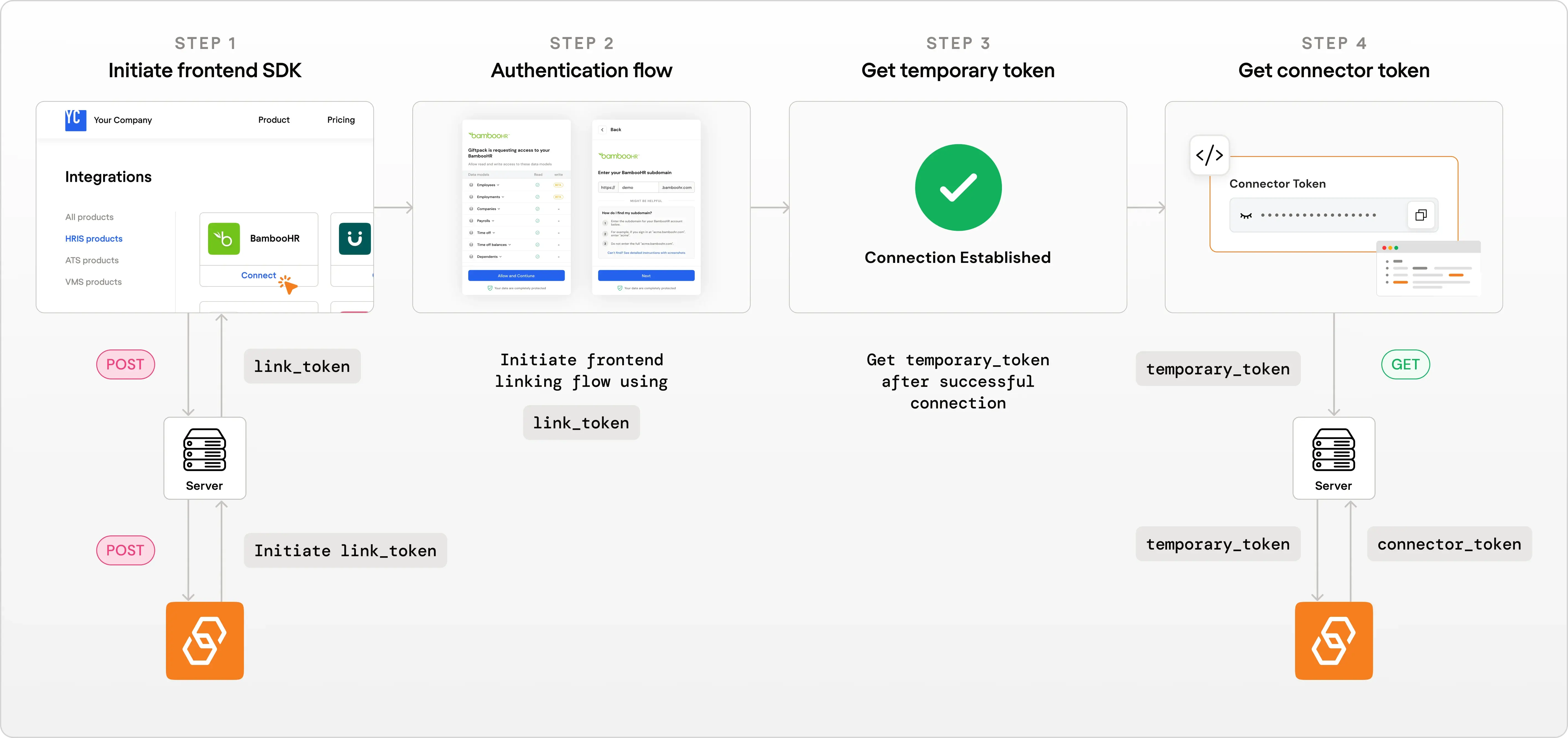
Bindbee Embed uses four steps to securely authenticate your customer's integrations and allow you to embed the entire magic link flow inside your own product.
**Step 1:** Generate a `link_token` to initialize a Bindbee Embed session for your end user.
**Step 2:** Embed Bindbee Embed in your frontend using your frontend (using either [React SDK](https://www.npmjs.com/package/@bindbee/react-link) or [JavaScript CDN](https://cdn.bindbee.dev/initialize.min.js)).
**Step 3:** Retrieve a `temporary_token` upon successful integration.
**Step 4:** Exchange the `temporary_token` for a `connector_token`, which authenticates future requests to the Unified API.
### Step 1: Generate `link_token`
To start, generate a link\_token by making a POST request to the following endpoint: `https://api.bindbee.dev/api/embedded/v1/link/create-link-token`.
#### What is a `link_token`?
A `link_token` is a unique code that allows you to start the linking process for integrating with third-party services like HRIS, Payroll, LMS or ATS systems.
#### Generating the `link_token`?
You will need [**BINDBEE\_API\_KEY**](/api-reference/basics/authentication#bindbee-api-key) for authentication.
The type of API key you use determines the environment of the connector created:
* Using a **Production API key** creates a **Production connector**\\
* Using a **Development API key** creates a **Development connector**
These environments are completely isolated. Make sure to use the appropriate API key for your use case.
Learn more about [Development](/features/environments/development) and [Production](/features/environments/production) environments.
You will also need to send some information about end user, integration category, and the specific integration you want to connect to.
#### How to get Integration Category and Name?
To get the category and Integration name refer to [Integrations](/sdk/integrations) page
```python Python theme={null}
import requests
url = 'https://api.bindbee.dev/api/embedded/v1/link/create-link-token'
api_key = ''
headers = {
'accept': 'application/json',
'Content-Type': 'application/json'
'Authorization': f"Bearer {api_key}",
}
data = {
"end_user_data": {
"org_name": "Acme Corp.", # Unique entity name of your customer's organisation
"origin_id": "064e1cd7-49ad-4e6d-8005-7e4c92fe9675" # Unique ID to Identify your customer's organisation
},
"category": "HRIS", # category
"integration": "bamboohr" # Integration name
}
response = requests.post(url, headers=headers, json=data)
print(response.json())
```
```bash cURL theme={null}
curl -X 'POST' \
'https://api.bindbee.dev/api/embedded/v1/link/create-link-token' \
-H 'accept: application/json' \
-H 'Content-Type: application/json' \
-H 'Authorization: Bearer ' \
-d '{
"end_user_data": {
"org_name": "Acme Corp.",
"origin_id": "064e1cd7-49ad-4e6d-8005-7e4c92fe9675"
},
"category": "HRIS",
"integration": "bamboohr"
}'
```
```js JavaScript theme={null}
const fetch = require("node-fetch");
const url = "https://api.bindbee.dev/api/embedded/v1/link/create-link-token";
const headers = {
accept: "application/json",
"Content-Type": "application/json",
Authorization: "Bearer ",
};
const data = {
end_user_data: {
org_name: "Acme Corp.", // Unique entity name of your customer's organisation
origin_id: "064e1cd7-49ad-4e6d-8005-7e4c92fe9675", // Unique ID to Identify your customer's organisation
},
category: "HRIS", // category
integration: "bamboohr", // Integration name
};
fetch(url, {
method: "POST",
headers: headers,
body: JSON.stringify(data),
})
.then((response) => response.json())
.then((data) => console.log(data))
.catch((error) => console.error("Error:", error));
```
```php PHP theme={null}
'
];
$data = [
"end_user_data" => [
"org_name" => "Acme Corp.", // Unique entity name of your customer's organisation
"origin_id" => "064e1cd7-49ad-4e6d-8005-7e4c92fe9675" // Unique ID to Identify your customer's organisation
],
"category" => "HRIS", // category
"integration" => "bamboohr" // Integration name
];
$options = [
'http' => [
'header' => implode("\r\n", $headers),
'method' => 'POST',
'content' => json_encode($data)
]
];
$context = stream_context_create($options);
$result = file_get_contents($url, false, $context);
if ($result === FALSE) { /* Handle error */ }
var_dump($result);
?>
```
```go Go theme={null}
package main
import (
"bytes"
"encoding/json"
"fmt"
"net/http"
)
func main() {
url := "https://api.bindbee.dev/api/embedded/v1/link/create-link-token"
data := map[string]interface{}{
"end_user_data": map[string]string{
"org_name": "Acme Corp.", // Unique entity name of your customer's organisation
"origin_id": "064e1cd7-49ad-4e6d-8005-7e4c92fe9675", // Unique ID to Identify your customer's organisation
},
"category": "HRIS", // category
"integration": "bamboohr", // Integration name
}
jsonData, err := json.Marshal(data)
if err != nil {
fmt.Println(err)
return
}
req, err := http.NewRequest("POST", url, bytes.NewBuffer(jsonData))
if err != nil {
fmt.Println(err)
return
}
req.Header.Set("accept", "application/json")
req.Header.Set("Content-Type", "application/json")
req.Header.Set("Authorization", "Bearer ")
client := &http.Client{}
resp, err := client.Do(req)
if err != nil {
fmt.Println(err)
return
}
defer resp.Body.Close()
var result map[string]interface{}
json.NewDecoder(resp.Body).Decode(&result)
fmt.Println(result)
}
```
```java Java theme={null}
import java.io.OutputStream;
import java.net.HttpURLConnection;
import java.net.URL;
import java.util.Scanner;
public class Main {
public static void main(String[] args) {
try {
URL url = new URL("https://api.bindbee.dev/api/embedded/v1/link/create-link-token");
HttpURLConnection conn = (HttpURLConnection) url.openConnection();
conn.setRequestMethod("POST");
conn.setRequestProperty("accept", "application/json");
conn.setRequestProperty("Content-Type", "application/json");
conn.setRequestProperty("Authorization", "Bearer ");
conn.setDoOutput(true);
String jsonInputString = "{\"end_user_data\": {\"org_name\": \"Acme Corp.\",\"origin_id\": \"064e1cd7-49ad-4e6d-8005-7e4c92fe9675\"},\"category\": \"HRIS\",\"integration\": \"bamboohr\"}";
try (OutputStream os = conn.getOutputStream()) {
byte[] input = jsonInputString.getBytes("utf-8");
os.write(input, 0, input.length);
}
try (Scanner scanner = new Scanner(conn.getInputStream(), "UTF-8")) {
String response = scanner.useDelimiter("\\A").next();
System.out.println(response);
}
conn.disconnect();
} catch (Exception e) {
e.printStackTrace();
}
}
}
```
### Step 2: Embed Bindbee Embed in your product
You can implement Bindbee Embed using either the React SDK or our JavaScript CDN approach.
#### Option A: Using React SDK
If you are using React for your frontend, you can easily integrate the linking flow using our [React SDK](https://www.npmjs.com/package/@bindbee/react-link)
#### Installation
Run one of the following commands in your React project directory:
`npm install --save @bindbee/react-link`
or
`yarn add @bindbee/react-link`
#### How to use the SDK?
Import the `useBindbeeMagiclink` hook and integrate it into your React application. Here’s an example:
```js theme={null}
import React from "react";
// Run this in your React project:
// npm install --save @bindbee/react-link
import { useBindbeeMagiclink } from "@bindbee/react-link";
const App = () => {
const handleOnSuccess = (temporary_token) => {
// Use this token to get the connector_token
console.log("Temporary Token:", temporary_token);
};
const handleOnClose = () => {
// Optional: Perform any action when the user closes the linking flow
console.log("Linking flow closed");
};
const { open } = useBindbeeMagiclink({
linkToken: "LINK_TOKEN", // Replace LINK_TOKEN with the token retrieved from previous step,
serverUrl: "https://api.bindbee.dev", // OPTIONAL: use 'https://api-eu.bindbee.dev' for EU Region
onSuccess: handleOnSuccess,
onClose: handleOnClose,
});
return ;
};
export default App;
```
#### How it works?
* `useBindbeeMagiclink` is a hook that handles the linking flow which takes following parameters as input:
* `linkToken` is the token generated in Step 1.
* `serverUrl` is optional parameter used to specify region. eg. use '[https://api-eu.bindbee.dev](https://api-eu.bindbee.dev)' to use eu region.
* `onSuccess` is a callback function that is called when the linking process is successful.
* `onClose` is an optional callback function that is called when the user closes the linking flow.
#### Option B: Using JavaScript CDN
If you're using a framework or library other than React for your frontend, you can seamlessly integrate the linking flow using our JavaScript CDN.
#### Installation
Add the following script tag to your HTML:
```html HTML theme={null}
```
The `integrity` attribute ensures that the script has not been tampered with by verifying its cryptographic hash. The `crossorigin="anonymous"` attribute is required for Subresource Integrity (SRI) checks on CDN-hosted scripts.
You can also use the unminified CDN link if the previous URL doesn’t work:
```html HTML theme={null}
```
#### Usage
Here is a sample JavaScript code snippet for the implementation.
```js JavaScript theme={null}
// Initialize BindbeeEmbed
window.BindbeeEmbed.initialize({
linkToken: "LINK_TOKEN", // Replace with your link_token
serverUrl: "https://api.bindbee.dev", // OPTIONAL: use 'https://api-eu.bindbee.dev' for EU Region
onSuccess: (temporary_token) => {
// Handle the temporary token
console.log("Temporary Token:", temporary_token);
},
onClose: () => {
// Optional: Handle close event
console.log("Linking flow closed");
},
});
// Open the linking flow (e.g., on button click)
function openLinkingFlow() {
window.BindbeeEmbed.open();
}
// Clean up when needed
function cleanup() {
window.BindbeeEmbed.destroy();
}
```
#### HTML implementation example
Here’s a complete HTML code snippet for the implementation, including the JavaScript code:
```html HTML theme={null}
Bindbee Integration
```
### Step 3: Get `temporary_token`
After a successful linking process, you will receive a `temporary_token`. This token is used to retrieve the `connector_token`.
### Step 4: Get `connector_token` using the `temporary_token`
To get the connector\_token, make a GET request to the following endpoint: `https://api.bindbee.dev/api/embedded/v1/connectors/connector_token/{temporary_token}`
You will need [**BINDBEE\_API\_KEY**](/api-reference/basics/authentication#bindbee-api-key) for authentication.
#### What is `connector_token`?
`connector_token` is required for authorizing your Bindbee API requests effectively. for more information about connector\_token you can refer [here](/api-reference/basics/authentication#connector-tokens)
#### Getting the `connector_token`?
Important: Securely store this **connector\_token** in your database for authenticating future API requests to the Bindbee's Unified API regarding the end user's data.
Here’s an example on how to get the `connector_token`:
```python Python theme={null}
import requests
url = 'https://api.bindbee.dev/api/embedded/v1/connectors/connector_token/{temporary_token}'
headers = {
'accept': 'application/json',
'Authorization': 'Bearer '
}
response = requests.get(url, headers=headers)
print(response.json())
```
```bash cURL theme={null}
curl -X 'GET' \
'https://api.bindbee.dev/api/embedded/v1/connectors/connector_token/{temporary_token}' \
-H 'accept: application/json' \
-H 'Authorization: Bearer '
```
```js Javascript theme={null}
const fetch = require("node-fetch");
const url =
"https://api.bindbee.dev/api/embedded/v1/connectors/connector_token/{temporary_token}";
const headers = {
accept: "application/json",
Authorization: "Bearer ",
};
fetch(url, {
method: "GET",
headers: headers,
})
.then((response) => response.json())
.then((data) => console.log(data))
.catch((error) => console.error("Error:", error));
```
```php PHP theme={null}
'
];
$options = [
'http' => [
'header' => implode("\r\n", $headers),
'method' => 'GET'
]
];
$context = stream_context_create($options);
$result = file_get_contents($url, false, $context);
if ($result === FALSE) { /* Handle error */ }
var_dump($result);
?>
```
```go Go theme={null}
package main
import (
"fmt"
"io/ioutil"
"net/http"
)
func main() {
url := "https://api.bindbee.dev/api/embedded/v1/connectors/connector_token/{temporary_token}"
req, _ := http.NewRequest("GET", url, nil)
req.Header.Set("accept", "application/json")
req.Header.Set("Authorization", "Bearer ")
client := &http.Client{}
resp, err := client.Do(req)
if err != nil {
fmt.Println(err)
return
}
defer resp.Body.Close()
body, _ := ioutil.ReadAll(resp.Body)
fmt.Println(string(body))
}
```
```java Java theme={null}
import java.io.InputStreamReader;
import java.io.BufferedReader;
import java.net.HttpURLConnection;
import java.net.URL;
public class Main {
public static void main(String[] args) {
try {
URL url = new URL("https://api.bindbee.dev/api/embedded/v1/connectors/connector_token/{temporary_token}");
HttpURLConnection conn = (HttpURLConnection) url.openConnection();
conn.setRequestMethod("GET");
conn.setRequestProperty("accept", "application/json");
conn.setRequestProperty("Authorization", "Bearer ");
BufferedReader in = new BufferedReader(new InputStreamReader(conn.getInputStream()));
String inputLine;
StringBuffer content = new StringBuffer();
while ((inputLine = in.readLine()) != null) {
content.append(inputLine);
}
in.close();
conn.disconnect();
System.out.println(content.toString());
} catch (Exception e) {
e.printStackTrace();
}
}
}
```