> ## Documentation Index
> Fetch the complete documentation index at: https://docs.bindbee.dev/llms.txt
> Use this file to discover all available pages before exploring further.
# Create a Webhook
> Subscribe an endpoint to connector and data events from the dashboard.
One webhook sends the events you choose to one URL, for every connector in the environments you pick.
**Before you start**
* An HTTPS endpoint that accepts `POST` requests and answers with a `2xx` within 10 seconds.
* Access to the Bindbee dashboard. Admins and Members can both manage webhooks - see [Roles and permissions](/guides/workspace/roles-and-permissions).
## Steps
Go to **[Webhooks](https://app.bindbee.dev/webhooks)** in the sidebar and click **Add webhook**.
Type the URL after the fixed `https://` prefix. Click **Send test event** to confirm Bindbee can reach it.
The check sends one `HEAD` request with no body, from the same network Bindbee delivers from.
Leave **API Versions** on **Version 2 (2026.10.06)**, the one marked **Recommended**. The version can't be changed once the webhook exists.
Enter a **Webhook Name** that says what the endpoint does, for example
`Employee sync`. Names are unique in your organization, and the name
identifies the webhook in delivery logs.
Under **Webhook Type**, tick **Production**, **Development**, or both. The
webhook fires only for connectors in the environments you tick - see
[Environments](/get-started/environments).
Events are grouped into **Connector changes** and **Data model changes**, which has one group per category, such as **HRIS Data Model**.
* Tick an event, or tick **Select all events** to take a whole group.
* In a data model group, tick a model's row for both its created and updated events, or tick the **Created** or **Update** column alone.
* Click the code icon beside an event to see a sample body in the **Event Payload** panel.
Subscribe only to what your handler processes. [Webhook events](/guides/webhooks/events) lists when each one fires.
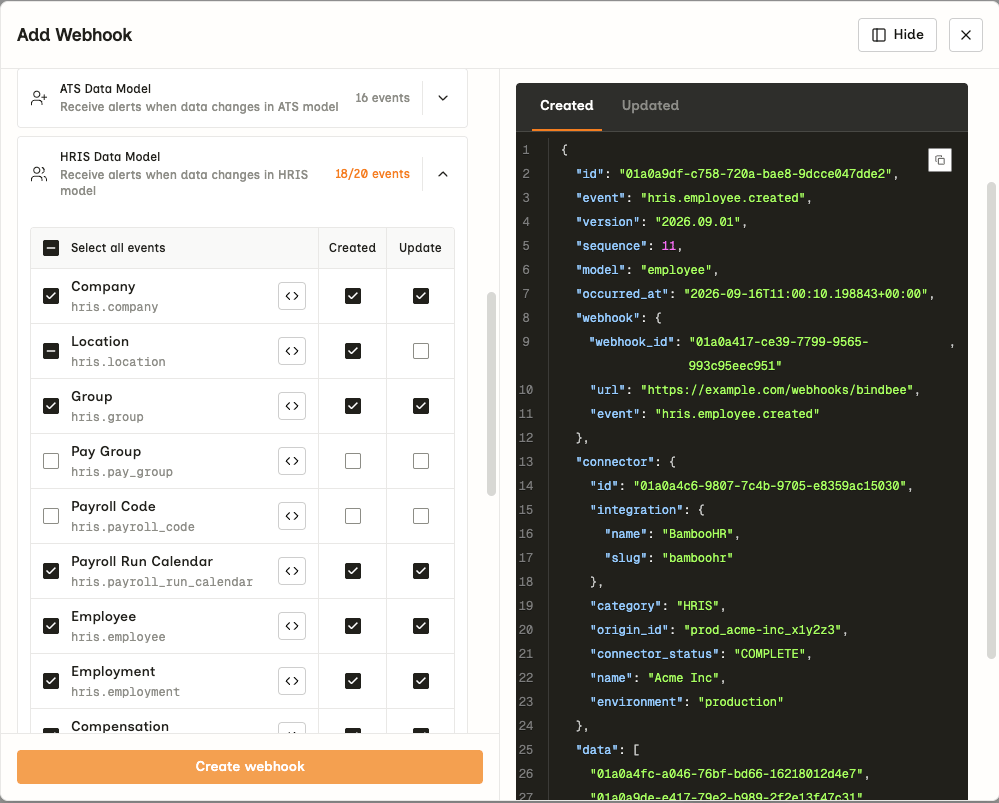 Click **Create webhook**.
Next, [verify the signature](/guides/webhooks/verify-signatures) on every request your endpoint receives.
## Frequently Asked Questions
Bindbee rejects public request-inspection services (`webhook.site`, `webhook-test.com`), URL shorteners (`bit.ly`, `t.co`, `tinyurl.com`), and any address that resolves to a private network. Use your own endpoint, or a tunnel to one while you develop.
Your endpoint either answered `HEAD` with a `5xx`, or Bindbee got no response
at all: DNS, TLS, a refused connection or a timeout. Check the endpoint is
publicly reachable over HTTPS, then try again.
Check these, in order:
1. **Enable** is on for the webhook.
2. The connector's environment is one the webhook covers. A Development connector never triggers a Production-only webhook.
3. The event matches the connector's category. An `ats.*` event never fires for an HRIS connector.
4. A data event fires only when a sync created or updated records of that model. A sync with no changes sends only `connector.sync.started` and `connector.sync.completed`.
Then check the webhook's delivery logs - see [Delivery and retries](/guides/webhooks/delivery#monitor-deliveries).
Open the webhook and click **Edit**. You can change the name, URL,
environments and events. Saving replaces the event list with exactly what is
ticked.
Create a new webhook on the version you want. The same URL can be registered
under both versions while you switch - see [Migrate from version
1](/guides/webhooks/migrate-from-v1).
To pause it, switch **Enable** off on the webhook's page or in the list. Nothing is queued while it's off, so events from that period are never sent.
To delete it, open **Settings** on the webhook's page and click **Delete webhook** under **Danger zone**. Deletion can't be undone.
## Related
* [Webhook events](/guides/webhooks/events) - what each event means before you subscribe
* [Verify webhook signatures](/guides/webhooks/verify-signatures) - the next step for your endpoint
* [Delivery and retries](/guides/webhooks/delivery) - what your endpoint should return, and when Bindbee retries
* [Environments](/get-started/environments) - why Production and Development connectors trigger different webhooks
This documentation is built and hosted on [Mintlify](https://mintlify.com), a developer documentation platform.
Click **Create webhook**.
Next, [verify the signature](/guides/webhooks/verify-signatures) on every request your endpoint receives.
## Frequently Asked Questions
Bindbee rejects public request-inspection services (`webhook.site`, `webhook-test.com`), URL shorteners (`bit.ly`, `t.co`, `tinyurl.com`), and any address that resolves to a private network. Use your own endpoint, or a tunnel to one while you develop.
Your endpoint either answered `HEAD` with a `5xx`, or Bindbee got no response
at all: DNS, TLS, a refused connection or a timeout. Check the endpoint is
publicly reachable over HTTPS, then try again.
Check these, in order:
1. **Enable** is on for the webhook.
2. The connector's environment is one the webhook covers. A Development connector never triggers a Production-only webhook.
3. The event matches the connector's category. An `ats.*` event never fires for an HRIS connector.
4. A data event fires only when a sync created or updated records of that model. A sync with no changes sends only `connector.sync.started` and `connector.sync.completed`.
Then check the webhook's delivery logs - see [Delivery and retries](/guides/webhooks/delivery#monitor-deliveries).
Open the webhook and click **Edit**. You can change the name, URL,
environments and events. Saving replaces the event list with exactly what is
ticked.
Create a new webhook on the version you want. The same URL can be registered
under both versions while you switch - see [Migrate from version
1](/guides/webhooks/migrate-from-v1).
To pause it, switch **Enable** off on the webhook's page or in the list. Nothing is queued while it's off, so events from that period are never sent.
To delete it, open **Settings** on the webhook's page and click **Delete webhook** under **Danger zone**. Deletion can't be undone.
## Related
* [Webhook events](/guides/webhooks/events) - what each event means before you subscribe
* [Verify webhook signatures](/guides/webhooks/verify-signatures) - the next step for your endpoint
* [Delivery and retries](/guides/webhooks/delivery) - what your endpoint should return, and when Bindbee retries
* [Environments](/get-started/environments) - why Production and Development connectors trigger different webhooks
This documentation is built and hosted on [Mintlify](https://mintlify.com), a developer documentation platform.