> ## Documentation Index
> Fetch the complete documentation index at: https://docs.bindbee.dev/llms.txt
> Use this file to discover all available pages before exploring further.
# Webhooks
> Receive real-time notifications when a connector syncs or when synced data changes, instead of polling the API.
Webhooks let Bindbee push updates to you. When a sync starts, finishes or fails, and when records are created or updated, Bindbee sends a `POST` to a URL you control.
***
## Events
Five events are available. The dashboard groups them under **Get notified when**, and each label is the event string in title case.
**On Connector changes**
| Dashboard label | Event | Fires when |
| ---------------------- | ------------------------ | --------------------------------- |
| Connector Synced | `connector_synced` | A sync job finishes successfully |
| Connector Sync Started | `connector_sync_started` | A sync job begins for a connector |
| Connector Sync Error | `connector_sync_error` | A sync job fails |
**On Data model changes**
| Dashboard label | Event | Fires when |
| ----------------------- | ------------------------- | ------------------------------------------------------------------ |
| Connector Data Modified | `connector_data_modified` | One or more records in any supported model were created or updated |
| Employee Data Changed | `employee_data_changed` | One or more employee records were created or updated |
`connector_synced` is the event most integrations start with. It is the cleanest signal that a newly connected account has finished its initial sync and is ready to use in your product.
***
## Creating a webhook
Webhooks are configured in the dashboard, under **Configure → [Webhooks](https://app.bindbee.dev/webhooks)**.
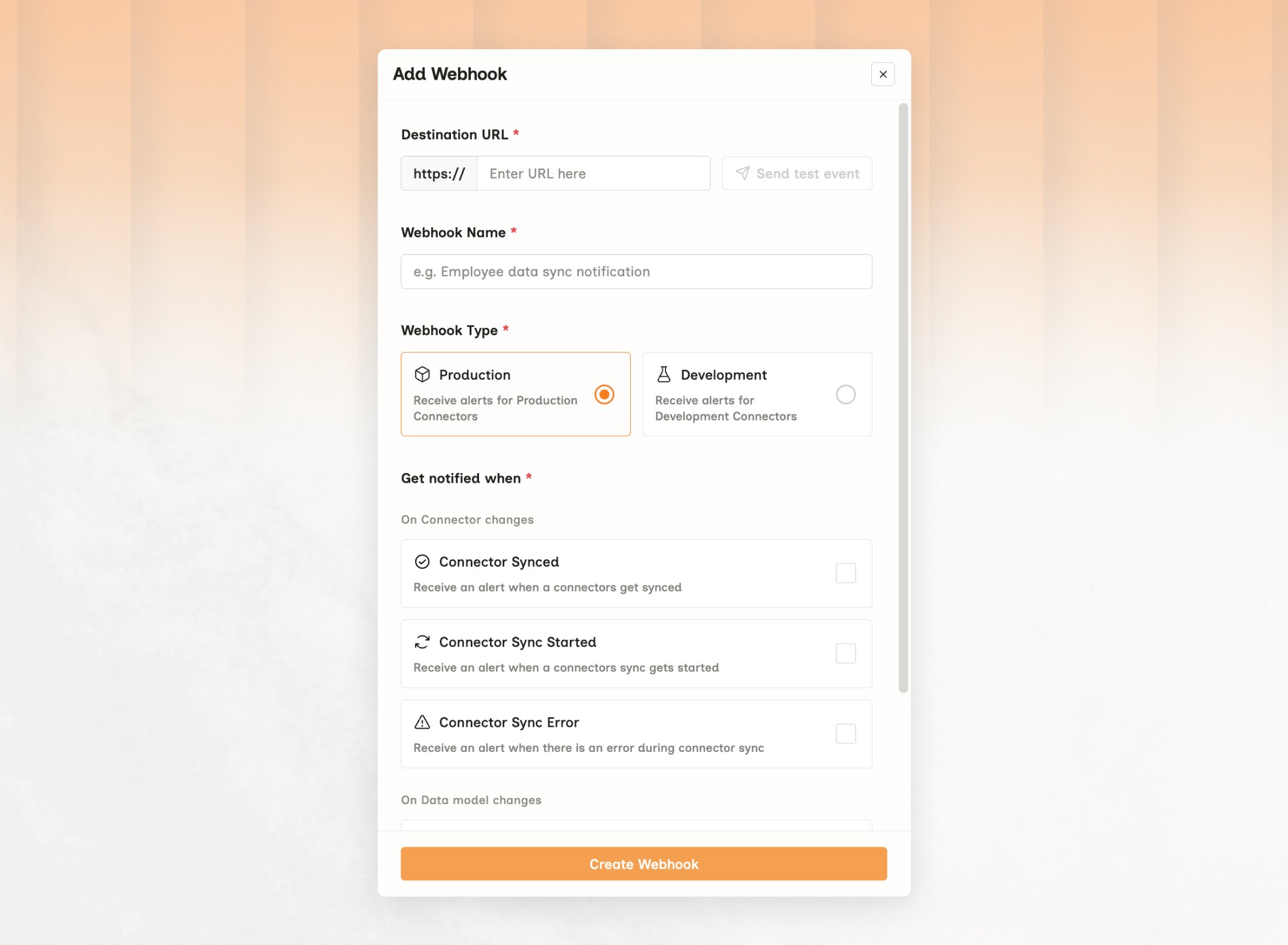 Add the URL that should receive the notifications. Use **Test URL** to confirm your endpoint is reachable and accepting requests before you save.
Give it something descriptive, for example `Employee data`. The name appears in delivery logs, which makes tracing a specific delivery easier later.
Webhooks are environment-specific. A Production webhook never fires for a Development connector, and the reverse is also true — if you are testing and nothing arrives, check this first. See [Environments](/get-started/environments).
Tick the events you want. One webhook can subscribe to several, or you can create separate webhooks per event to route them to different handlers. Then press **Create webhook**.
***
## Webhook Signature
Your URL is public, so anyone can post to it. Check the signature on every request, and only act on the ones that really came from Bindbee.
Each request carries an `X-Bindbee-Webhook-Signature` header. Hash the raw body with your signature key and compare the result to that header. If they don't match, reject the request.
Your signature key is under **Security** on the Webhooks page. It is unique to your organization, and you can regenerate it if it ever leaks.
```python Python theme={null}
import base64, hashlib, hmac
signature_key = "YOUR_WEBHOOK_SIGNATURE_KEY"
received_signature = request.headers.get("X-Bindbee-Webhook-Signature")
if not received_signature:
raise ValueError("Signature header missing; request may not be from Bindbee.")
# Raw body bytes, not a re-serialised parsed object
body_bytes = request.body if isinstance(request.body, bytes) else request.body.encode("utf-8")
hmac_digest = hmac.new(
signature_key.encode("utf-8"),
body_bytes,
hashlib.sha256,
).digest()
expected_signature = base64.urlsafe_b64encode(hmac_digest).decode()
signature_valid = hmac.compare_digest(expected_signature, received_signature)
```
```javascript Node theme={null}
const crypto = require("crypto");
const express = require("express");
const app = express();
// Capture the raw body before Express parses it
app.use(express.json({
verify: (req, res, buf) => { req.rawBody = buf; },
}));
const webhookSecret = "YOUR_WEBHOOK_SIGNATURE_KEY";
app.post("/hooks/bindbee", (req, res) => {
// Node lower-cases incoming header names
const receivedSignature = req.headers["x-bindbee-webhook-signature"];
if (!receivedSignature) return res.status(401).send("Missing signature");
const expectedSignature = crypto
.createHmac("sha256", webhookSecret)
.update(req.rawBody)
.digest("base64")
.replace(/\+/g, "-")
.replace(/\//g, "_");
const a = Buffer.from(expectedSignature, "utf-8");
const b = Buffer.from(receivedSignature, "utf-8");
if (a.length !== b.length || !crypto.timingSafeEqual(a, b)) {
return res.status(401).send("Invalid signature");
}
// Respond first, process afterwards
res.sendStatus(200);
enqueue(req.body);
});
```
```ruby Ruby theme={null}
require 'base64'
require 'openssl'
secret_key = 'YOUR_WEBHOOK_SIGNATURE_KEY'
received_signature = request.headers['X-Bindbee-Webhook-Signature']
raise 'Signature header missing; request may not be from Bindbee.' unless received_signature
# Read the raw body, and rewind so later code can read it too
request.body.rewind
request_body = request.body.read
hmac_digest = OpenSSL::HMAC.digest(OpenSSL::Digest.new('sha256'), secret_key, request_body)
expected_signature = Base64.urlsafe_encode64(hmac_digest)
valid_signature = ActiveSupport::SecurityUtils.secure_compare(expected_signature, received_signature)
```
***
## Payload structure
Every payload shares a common envelope. Four objects are always present, and one more appears on failures.
| Key | Present on | Contains |
| ----------- | --------------------------- | --------------------------------------------- |
| `webhook` | All events | Which webhook fired and which event it was |
| `connector` | All events | The connector the event relates to |
| `sync` | All events | The sync job that triggered the event |
| `data` | All events | The event payload — its shape varies by event |
| `error` | `connector_sync_error` only | Details of the failure |
### `webhook`
```json theme={null}
{
"webhook_id": "10c9a6b1-4ea8-476e-bdb0-193001a94a8d",
"url": "https://example.com/hooks/bindbee",
"event": "connector_synced"
}
```
Read `webhook.event` to route the payload. Do not infer the event from the shape of `data`.
### `connector`
```json theme={null}
{
"id": "018f99e2-ed3a-7f4c-ae97-83d619bdf95c",
"display_name": "BreatheHR",
"integration_slug": "breathehr",
"categories": ["HRIS"],
"org_name": "Test Org",
"origin_id": "user_123",
"connector_status": "COMPLETE",
"end_user_name": "John Doe",
"end_user_email": "abc@xyz.com"
}
```
`origin_id` is the identifier you supplied when creating the connector, and it is usually the fastest way to map an incoming webhook back to a customer in your own database without storing Bindbee connector IDs.
`categories` is an array — a single connector can serve more than one category, for example `["LMS", "HRIS"]`.
### `sync`
```json theme={null}
{
"sync_id": "019f146e-8396-7c6d-aff3-c5760bf5eefe",
"sync_type": "AUTOMATED",
"sync_name": "#13"
}
```
| Field | Description |
| ----------- | ------------------------------------------------------------------------------------------------------------------------------------------- |
| `sync_id` | Unique identifier of the sync job |
| `sync_type` | `AUTOMATED` for a scheduled sync, `MANUAL` for one you triggered — see [Forcing a resync](/guides/reading-writing/syncing#forcing-a-resync) |
| `sync_name` | The name assigned to the sync job, incrementing per run (`#1`, `#2`) |
`sync_id` is stable across every event from the same job, so you can correlate a `connector_sync_started` with the `connector_synced` that closes it. It also works as an idempotency key, since a retried delivery carries the same values.
### `error`
Included only on `connector_sync_error`:
```json theme={null}
{
"failed_at": "2026-07-07T11:21:35.837448+00:00",
"message": "A runtime error occurred during the sync process. Bindbee team has been notified.",
"detail": {}
}
```
`detail` is returned as `{}` when no additional information is available.
### `data`
This is the part that changes between events, so handle it per event rather than writing one parser for all five.
| Event | `data` shape |
| ------------------------- | ------------------------------------------------------------- |
| `connector_sync_started` | Object describing the sync, with `display_status: "Syncing"` |
| `connector_synced` | Object describing the sync, with `display_status: "Done"` |
| `connector_sync_error` | Object describing the sync, with `display_status: "Failed"` |
| `employee_data_changed` | Array of employee IDs |
| `connector_data_modified` | Object keyed by model name, each value an array of record IDs |
***
## Sample payloads
```json theme={null}
{
"webhook": {
"webhook_id": "10c9a6b1-4ea8-476e-bdb0-193001a94a8d",
"url": "https://example.com/hooks/bindbee",
"event": "connector_sync_started"
},
"connector": {
"id": "018f99e2-ed3a-7f4c-ae97-83d619bdf95c",
"display_name": "BreatheHR",
"integration_slug": "breathehr",
"categories": ["HRIS"],
"org_name": "Test Org",
"origin_id": "user_123",
"connector_status": "COMPLETE",
"end_user_name": "John Doe",
"end_user_email": "abc@xyz.com"
},
"data": {
"id": "018f99e7-886b-7c9f-a63a-f6fbc9da1f83",
"integration_name": "breathehr",
"category": "HRIS",
"display_status": "Syncing",
"last_sync_start_time": "2024-07-22T09:49:30.478384+00:00"
},
"sync": {
"sync_id": "019f146e-8396-7c6d-aff3-c5760bf5eef8",
"sync_type": "AUTOMATED",
"sync_name": "#13"
}
}
```
```json theme={null}
{
"webhook": {
"webhook_id": "10c9a6b1-4ea8-476e-bdb0-193001a94a8d",
"url": "https://example.com/hooks/bindbee",
"event": "connector_synced"
},
"connector": {
"id": "018f99e2-ed3a-7f4c-ae97-83d619bdf95c",
"display_name": "BreatheHR",
"integration_slug": "breathehr",
"categories": ["HRIS"],
"org_name": "Test Org",
"origin_id": "user_123",
"connector_status": "COMPLETE",
"end_user_name": "John Doe",
"end_user_email": "abc@xyz.com"
},
"data": {
"id": "018f99e7-886b-7c9f-a63a-f6fbc9da1f83",
"integration_name": "breathehr",
"category": "HRIS",
"display_status": "Done",
"last_sync_start_time": "2024-07-22T09:49:22.922083+00:00"
},
"sync": {
"sync_id": "019f146e-8396-7c6d-aff3-c5760bf5eef8",
"sync_type": "AUTOMATED",
"sync_name": "#13"
}
}
```
```json theme={null}
{
"webhook": {
"webhook_id": "704ec26b-585d-4551-a833-e447e3313c78",
"url": "https://example.com/hooks/bindbee",
"event": "connector_sync_error"
},
"connector": {
"id": "019ebc1c-953a-7ba9-b599-0e6599e30304",
"display_name": "Workday",
"integration_slug": "workday",
"categories": ["LMS", "HRIS"],
"org_name": "Test Org",
"origin_id": "user_456",
"connector_status": "COMPLETE",
"end_user_name": "Acme Corp.",
"end_user_email": null
},
"data": {
"id": "018f96ad-459c-7fd5-a24a-2c3a6c1a64e8",
"integration_name": "workday",
"category": "HRIS",
"display_status": "Failed"
},
"error": {
"failed_at": "2026-07-07T11:21:35.837448+00:00",
"message": "A runtime error occurred during the sync process. Bindbee team has been notified.",
"detail": {}
},
"sync": {
"sync_id": "019f3c4f-dbc2-7480-a6d5-f1f789ee05c1",
"sync_type": "AUTOMATED",
"sync_name": "#6"
}
}
```
`data` is a flat array of employee IDs. Fetch them with the `ids` parameter on [Get Employees](/hris/employee/get-employees).
```json theme={null}
{
"webhook": {
"webhook_id": "10c9a6b1-4ea8-476e-bdb0-193001a94a8d",
"url": "https://example.com/hooks/bindbee",
"event": "employee_data_changed"
},
"connector": {
"id": "018f99e2-ed3a-7f4c-ae97-83d619bdf95c",
"display_name": "BreatheHR",
"integration_slug": "breathehr",
"categories": ["HRIS"],
"org_name": "Test Org",
"origin_id": "user_123",
"connector_status": "COMPLETE",
"end_user_name": "John Doe",
"end_user_email": "abc@xyz.com"
},
"data": [
"0190d9d8-ac9b-76cb-a5ee-df70994e6f3d"
],
"sync": {
"sync_id": "019f146e-8396-7c6d-aff3-c5760bf5eef8",
"sync_type": "AUTOMATED",
"sync_name": "#13"
}
}
```
`data` is keyed by model name. Iterate the keys rather than assuming which models are present, since that depends on what changed in the sync.
```json theme={null}
{
"webhook": {
"webhook_id": "10c9a6b1-4ea8-476e-bdb0-193001a94a8d",
"url": "https://example.com/hooks/bindbee",
"event": "connector_data_modified"
},
"connector": {
"id": "018f99e2-ed3a-7f4c-ae97-83d619bdf95c",
"display_name": "BreatheHR",
"integration_slug": "breathehr",
"categories": ["HRIS"],
"org_name": "Test Org",
"origin_id": "user_123",
"connector_status": "COMPLETE",
"end_user_name": "John Doe",
"end_user_email": "abc@xyz.com"
},
"data": {
"hris_bank_info": [
"0190d9d8-cf5b-7ce4-b60f-1fd95c04adee"
],
"hris_employment": [
"0190d9d9-023d-7259-97e1-b38682dec062"
]
},
"sync": {
"sync_id": "019f146e-8396-7c6d-aff3-c5760bf5eef8",
"sync_type": "AUTOMATED",
"sync_name": "#13"
}
}
```
***
## Delivery and retries
When a webhook event is triggered, Bindbee sends a POST request to your configured destination URL. If the request fails due to a request or network-layer issue, Bindbee automatically retries the delivery up to 4 times within 60 seconds.
Each delivery attempt has a timeout of 10 seconds. Your server should respond within this window to avoid the request being treated as timed out.
### Retry behavior
| Property | Value |
| --------------- | --------------------------------------------------------------- |
| Maximum retries | Up to 4 retries |
| Retry window | Within 60 seconds |
| Request timeout | 10 seconds per attempt |
| Request method | `POST` |
| Retry trigger | Request and network-layer failures, and all non-`2xx` responses |
### Failures that trigger retries
Retries are triggered only for request or network-layer failures, including:
| Failure category | Examples |
| -------------------- | ------------------------------------------------------------------------ |
| Timeout errors | Connection timeout, read timeout, write timeout, connection pool timeout |
| Connection errors | Connection error, read error, write error, close error |
| Protocol errors | Local protocol error, remote protocol error, unsupported protocol error |
| Other request errors | Proxy error, response decoding error, too many redirects |
### Acknowledge first, process after
A handler that does its work before responding will exceed the 10-second timeout under load, and every timeout spends part of the retry budget. **Return `200` as soon as you have the payload, then process asynchronously.** Deliveries that exhaust all four retries are not redelivered later.
### Keeping a cron schedule
Subscribing to webhooks doesn't mean moving your processing onto them. Subscribe to `connector_sync_error` alone, purely as a signal to skip or defer that customer's run - your cron keeps its schedule, and stops processing a connection whose data hasn't updated.
***
## Monitoring deliveries
### In the dashboard
Delivery logs are on the [Webhooks tab](https://app.bindbee.dev/logs/webhooks) under Logs. Logs for one specific webhook are also shown on that webhook's own page.
### Through the API
Three endpoints cover the same ground programmatically, which is useful for alerting on delivery failures rather than discovering them by hand.
**[List your webhooks](/api-reference/webhooks/list-webhooks)** to get their IDs, names, URLs, enabled state, and when each last fired:
```bash theme={null}
curl -G https://api.bindbee.dev/api/v1/webhooks \
-H "Authorization: Bearer " \
-d is_active=true
```
**[List delivery attempts](/api-reference/webhooks/list-webhook-logs)**, with filters:
```bash theme={null}
curl -G https://api.bindbee.dev/api/v1/webhooks/logs \
-H "Authorization: Bearer " \
-d errors_only=true \
-d created_at_from=2026-08-01T00:00:00Z
```
| Parameter | Purpose |
| ---------------------------------- | --------------------------------------------------------------------------------- |
| `webhook_id` | Deliveries for one webhook |
| `connector_id` | Deliveries triggered for one connector |
| `webhook_action` | Comma separated event types, for example `connector_synced,employee_data_changed` |
| `response_code` | Comma separated status codes, for example `200,403,503` |
| `created_at_from`, `created_at_to` | ISO 8601 bounds, interpreted as UTC when no offset is supplied |
| `errors_only` | When `true`, only deliveries that returned `4xx` or `5xx` |
**[Get one delivery](/api-reference/webhooks/get-webhook-log-detail)** by its log ID for the full request and response detail, including the status code your endpoint returned:
```bash theme={null}
curl https://api.bindbee.dev/api/v1/webhooks/logs/ \
-H "Authorization: Bearer "
```
***
## Related
When syncs run, and how to trigger one on demand.
Why Production and Development webhooks fire separately.
Reading the records an event points at, with `ids` and `modified_after`.
Catching a connector that stopped, which silence will not tell you.
Add the URL that should receive the notifications. Use **Test URL** to confirm your endpoint is reachable and accepting requests before you save.
Give it something descriptive, for example `Employee data`. The name appears in delivery logs, which makes tracing a specific delivery easier later.
Webhooks are environment-specific. A Production webhook never fires for a Development connector, and the reverse is also true — if you are testing and nothing arrives, check this first. See [Environments](/get-started/environments).
Tick the events you want. One webhook can subscribe to several, or you can create separate webhooks per event to route them to different handlers. Then press **Create webhook**.
***
## Webhook Signature
Your URL is public, so anyone can post to it. Check the signature on every request, and only act on the ones that really came from Bindbee.
Each request carries an `X-Bindbee-Webhook-Signature` header. Hash the raw body with your signature key and compare the result to that header. If they don't match, reject the request.
Your signature key is under **Security** on the Webhooks page. It is unique to your organization, and you can regenerate it if it ever leaks.
```python Python theme={null}
import base64, hashlib, hmac
signature_key = "YOUR_WEBHOOK_SIGNATURE_KEY"
received_signature = request.headers.get("X-Bindbee-Webhook-Signature")
if not received_signature:
raise ValueError("Signature header missing; request may not be from Bindbee.")
# Raw body bytes, not a re-serialised parsed object
body_bytes = request.body if isinstance(request.body, bytes) else request.body.encode("utf-8")
hmac_digest = hmac.new(
signature_key.encode("utf-8"),
body_bytes,
hashlib.sha256,
).digest()
expected_signature = base64.urlsafe_b64encode(hmac_digest).decode()
signature_valid = hmac.compare_digest(expected_signature, received_signature)
```
```javascript Node theme={null}
const crypto = require("crypto");
const express = require("express");
const app = express();
// Capture the raw body before Express parses it
app.use(express.json({
verify: (req, res, buf) => { req.rawBody = buf; },
}));
const webhookSecret = "YOUR_WEBHOOK_SIGNATURE_KEY";
app.post("/hooks/bindbee", (req, res) => {
// Node lower-cases incoming header names
const receivedSignature = req.headers["x-bindbee-webhook-signature"];
if (!receivedSignature) return res.status(401).send("Missing signature");
const expectedSignature = crypto
.createHmac("sha256", webhookSecret)
.update(req.rawBody)
.digest("base64")
.replace(/\+/g, "-")
.replace(/\//g, "_");
const a = Buffer.from(expectedSignature, "utf-8");
const b = Buffer.from(receivedSignature, "utf-8");
if (a.length !== b.length || !crypto.timingSafeEqual(a, b)) {
return res.status(401).send("Invalid signature");
}
// Respond first, process afterwards
res.sendStatus(200);
enqueue(req.body);
});
```
```ruby Ruby theme={null}
require 'base64'
require 'openssl'
secret_key = 'YOUR_WEBHOOK_SIGNATURE_KEY'
received_signature = request.headers['X-Bindbee-Webhook-Signature']
raise 'Signature header missing; request may not be from Bindbee.' unless received_signature
# Read the raw body, and rewind so later code can read it too
request.body.rewind
request_body = request.body.read
hmac_digest = OpenSSL::HMAC.digest(OpenSSL::Digest.new('sha256'), secret_key, request_body)
expected_signature = Base64.urlsafe_encode64(hmac_digest)
valid_signature = ActiveSupport::SecurityUtils.secure_compare(expected_signature, received_signature)
```
***
## Payload structure
Every payload shares a common envelope. Four objects are always present, and one more appears on failures.
| Key | Present on | Contains |
| ----------- | --------------------------- | --------------------------------------------- |
| `webhook` | All events | Which webhook fired and which event it was |
| `connector` | All events | The connector the event relates to |
| `sync` | All events | The sync job that triggered the event |
| `data` | All events | The event payload — its shape varies by event |
| `error` | `connector_sync_error` only | Details of the failure |
### `webhook`
```json theme={null}
{
"webhook_id": "10c9a6b1-4ea8-476e-bdb0-193001a94a8d",
"url": "https://example.com/hooks/bindbee",
"event": "connector_synced"
}
```
Read `webhook.event` to route the payload. Do not infer the event from the shape of `data`.
### `connector`
```json theme={null}
{
"id": "018f99e2-ed3a-7f4c-ae97-83d619bdf95c",
"display_name": "BreatheHR",
"integration_slug": "breathehr",
"categories": ["HRIS"],
"org_name": "Test Org",
"origin_id": "user_123",
"connector_status": "COMPLETE",
"end_user_name": "John Doe",
"end_user_email": "abc@xyz.com"
}
```
`origin_id` is the identifier you supplied when creating the connector, and it is usually the fastest way to map an incoming webhook back to a customer in your own database without storing Bindbee connector IDs.
`categories` is an array — a single connector can serve more than one category, for example `["LMS", "HRIS"]`.
### `sync`
```json theme={null}
{
"sync_id": "019f146e-8396-7c6d-aff3-c5760bf5eefe",
"sync_type": "AUTOMATED",
"sync_name": "#13"
}
```
| Field | Description |
| ----------- | ------------------------------------------------------------------------------------------------------------------------------------------- |
| `sync_id` | Unique identifier of the sync job |
| `sync_type` | `AUTOMATED` for a scheduled sync, `MANUAL` for one you triggered — see [Forcing a resync](/guides/reading-writing/syncing#forcing-a-resync) |
| `sync_name` | The name assigned to the sync job, incrementing per run (`#1`, `#2`) |
`sync_id` is stable across every event from the same job, so you can correlate a `connector_sync_started` with the `connector_synced` that closes it. It also works as an idempotency key, since a retried delivery carries the same values.
### `error`
Included only on `connector_sync_error`:
```json theme={null}
{
"failed_at": "2026-07-07T11:21:35.837448+00:00",
"message": "A runtime error occurred during the sync process. Bindbee team has been notified.",
"detail": {}
}
```
`detail` is returned as `{}` when no additional information is available.
### `data`
This is the part that changes between events, so handle it per event rather than writing one parser for all five.
| Event | `data` shape |
| ------------------------- | ------------------------------------------------------------- |
| `connector_sync_started` | Object describing the sync, with `display_status: "Syncing"` |
| `connector_synced` | Object describing the sync, with `display_status: "Done"` |
| `connector_sync_error` | Object describing the sync, with `display_status: "Failed"` |
| `employee_data_changed` | Array of employee IDs |
| `connector_data_modified` | Object keyed by model name, each value an array of record IDs |
***
## Sample payloads
```json theme={null}
{
"webhook": {
"webhook_id": "10c9a6b1-4ea8-476e-bdb0-193001a94a8d",
"url": "https://example.com/hooks/bindbee",
"event": "connector_sync_started"
},
"connector": {
"id": "018f99e2-ed3a-7f4c-ae97-83d619bdf95c",
"display_name": "BreatheHR",
"integration_slug": "breathehr",
"categories": ["HRIS"],
"org_name": "Test Org",
"origin_id": "user_123",
"connector_status": "COMPLETE",
"end_user_name": "John Doe",
"end_user_email": "abc@xyz.com"
},
"data": {
"id": "018f99e7-886b-7c9f-a63a-f6fbc9da1f83",
"integration_name": "breathehr",
"category": "HRIS",
"display_status": "Syncing",
"last_sync_start_time": "2024-07-22T09:49:30.478384+00:00"
},
"sync": {
"sync_id": "019f146e-8396-7c6d-aff3-c5760bf5eef8",
"sync_type": "AUTOMATED",
"sync_name": "#13"
}
}
```
```json theme={null}
{
"webhook": {
"webhook_id": "10c9a6b1-4ea8-476e-bdb0-193001a94a8d",
"url": "https://example.com/hooks/bindbee",
"event": "connector_synced"
},
"connector": {
"id": "018f99e2-ed3a-7f4c-ae97-83d619bdf95c",
"display_name": "BreatheHR",
"integration_slug": "breathehr",
"categories": ["HRIS"],
"org_name": "Test Org",
"origin_id": "user_123",
"connector_status": "COMPLETE",
"end_user_name": "John Doe",
"end_user_email": "abc@xyz.com"
},
"data": {
"id": "018f99e7-886b-7c9f-a63a-f6fbc9da1f83",
"integration_name": "breathehr",
"category": "HRIS",
"display_status": "Done",
"last_sync_start_time": "2024-07-22T09:49:22.922083+00:00"
},
"sync": {
"sync_id": "019f146e-8396-7c6d-aff3-c5760bf5eef8",
"sync_type": "AUTOMATED",
"sync_name": "#13"
}
}
```
```json theme={null}
{
"webhook": {
"webhook_id": "704ec26b-585d-4551-a833-e447e3313c78",
"url": "https://example.com/hooks/bindbee",
"event": "connector_sync_error"
},
"connector": {
"id": "019ebc1c-953a-7ba9-b599-0e6599e30304",
"display_name": "Workday",
"integration_slug": "workday",
"categories": ["LMS", "HRIS"],
"org_name": "Test Org",
"origin_id": "user_456",
"connector_status": "COMPLETE",
"end_user_name": "Acme Corp.",
"end_user_email": null
},
"data": {
"id": "018f96ad-459c-7fd5-a24a-2c3a6c1a64e8",
"integration_name": "workday",
"category": "HRIS",
"display_status": "Failed"
},
"error": {
"failed_at": "2026-07-07T11:21:35.837448+00:00",
"message": "A runtime error occurred during the sync process. Bindbee team has been notified.",
"detail": {}
},
"sync": {
"sync_id": "019f3c4f-dbc2-7480-a6d5-f1f789ee05c1",
"sync_type": "AUTOMATED",
"sync_name": "#6"
}
}
```
`data` is a flat array of employee IDs. Fetch them with the `ids` parameter on [Get Employees](/hris/employee/get-employees).
```json theme={null}
{
"webhook": {
"webhook_id": "10c9a6b1-4ea8-476e-bdb0-193001a94a8d",
"url": "https://example.com/hooks/bindbee",
"event": "employee_data_changed"
},
"connector": {
"id": "018f99e2-ed3a-7f4c-ae97-83d619bdf95c",
"display_name": "BreatheHR",
"integration_slug": "breathehr",
"categories": ["HRIS"],
"org_name": "Test Org",
"origin_id": "user_123",
"connector_status": "COMPLETE",
"end_user_name": "John Doe",
"end_user_email": "abc@xyz.com"
},
"data": [
"0190d9d8-ac9b-76cb-a5ee-df70994e6f3d"
],
"sync": {
"sync_id": "019f146e-8396-7c6d-aff3-c5760bf5eef8",
"sync_type": "AUTOMATED",
"sync_name": "#13"
}
}
```
`data` is keyed by model name. Iterate the keys rather than assuming which models are present, since that depends on what changed in the sync.
```json theme={null}
{
"webhook": {
"webhook_id": "10c9a6b1-4ea8-476e-bdb0-193001a94a8d",
"url": "https://example.com/hooks/bindbee",
"event": "connector_data_modified"
},
"connector": {
"id": "018f99e2-ed3a-7f4c-ae97-83d619bdf95c",
"display_name": "BreatheHR",
"integration_slug": "breathehr",
"categories": ["HRIS"],
"org_name": "Test Org",
"origin_id": "user_123",
"connector_status": "COMPLETE",
"end_user_name": "John Doe",
"end_user_email": "abc@xyz.com"
},
"data": {
"hris_bank_info": [
"0190d9d8-cf5b-7ce4-b60f-1fd95c04adee"
],
"hris_employment": [
"0190d9d9-023d-7259-97e1-b38682dec062"
]
},
"sync": {
"sync_id": "019f146e-8396-7c6d-aff3-c5760bf5eef8",
"sync_type": "AUTOMATED",
"sync_name": "#13"
}
}
```
***
## Delivery and retries
When a webhook event is triggered, Bindbee sends a POST request to your configured destination URL. If the request fails due to a request or network-layer issue, Bindbee automatically retries the delivery up to 4 times within 60 seconds.
Each delivery attempt has a timeout of 10 seconds. Your server should respond within this window to avoid the request being treated as timed out.
### Retry behavior
| Property | Value |
| --------------- | --------------------------------------------------------------- |
| Maximum retries | Up to 4 retries |
| Retry window | Within 60 seconds |
| Request timeout | 10 seconds per attempt |
| Request method | `POST` |
| Retry trigger | Request and network-layer failures, and all non-`2xx` responses |
### Failures that trigger retries
Retries are triggered only for request or network-layer failures, including:
| Failure category | Examples |
| -------------------- | ------------------------------------------------------------------------ |
| Timeout errors | Connection timeout, read timeout, write timeout, connection pool timeout |
| Connection errors | Connection error, read error, write error, close error |
| Protocol errors | Local protocol error, remote protocol error, unsupported protocol error |
| Other request errors | Proxy error, response decoding error, too many redirects |
### Acknowledge first, process after
A handler that does its work before responding will exceed the 10-second timeout under load, and every timeout spends part of the retry budget. **Return `200` as soon as you have the payload, then process asynchronously.** Deliveries that exhaust all four retries are not redelivered later.
### Keeping a cron schedule
Subscribing to webhooks doesn't mean moving your processing onto them. Subscribe to `connector_sync_error` alone, purely as a signal to skip or defer that customer's run - your cron keeps its schedule, and stops processing a connection whose data hasn't updated.
***
## Monitoring deliveries
### In the dashboard
Delivery logs are on the [Webhooks tab](https://app.bindbee.dev/logs/webhooks) under Logs. Logs for one specific webhook are also shown on that webhook's own page.
### Through the API
Three endpoints cover the same ground programmatically, which is useful for alerting on delivery failures rather than discovering them by hand.
**[List your webhooks](/api-reference/webhooks/list-webhooks)** to get their IDs, names, URLs, enabled state, and when each last fired:
```bash theme={null}
curl -G https://api.bindbee.dev/api/v1/webhooks \
-H "Authorization: Bearer " \
-d is_active=true
```
**[List delivery attempts](/api-reference/webhooks/list-webhook-logs)**, with filters:
```bash theme={null}
curl -G https://api.bindbee.dev/api/v1/webhooks/logs \
-H "Authorization: Bearer " \
-d errors_only=true \
-d created_at_from=2026-08-01T00:00:00Z
```
| Parameter | Purpose |
| ---------------------------------- | --------------------------------------------------------------------------------- |
| `webhook_id` | Deliveries for one webhook |
| `connector_id` | Deliveries triggered for one connector |
| `webhook_action` | Comma separated event types, for example `connector_synced,employee_data_changed` |
| `response_code` | Comma separated status codes, for example `200,403,503` |
| `created_at_from`, `created_at_to` | ISO 8601 bounds, interpreted as UTC when no offset is supplied |
| `errors_only` | When `true`, only deliveries that returned `4xx` or `5xx` |
**[Get one delivery](/api-reference/webhooks/get-webhook-log-detail)** by its log ID for the full request and response detail, including the status code your endpoint returned:
```bash theme={null}
curl https://api.bindbee.dev/api/v1/webhooks/logs/ \
-H "Authorization: Bearer "
```
***
## Related
When syncs run, and how to trigger one on demand.
Why Production and Development webhooks fire separately.
Reading the records an event points at, with `ids` and `modified_after`.
Catching a connector that stopped, which silence will not tell you.